
Czkawka 12.0.2 hunts duplicates and broken files
Summary
Czkawka 12.0.2 packs fourteen cleanup tools into one program: duplicate files, look-alike photos, broken archives, scanned locally, Krokiet as the front end.
Recommend- Name
- Czkawka
- Version
- 12.0.2
- Pricing
- Free
- Open source
- Open source
- Operating system
- WindowsmacOSLinuxAndroid
- Updated
- 2026-11-19 16:42
A disk rarely fills in one go. A few duplicate filenames in the download folder, several versions of the same photo in the album, an old archive on the backup drive that will not open any more: none of them looks large alone, and together they eat a whole drive. Czkawka 12.0.2 is an open-source cleanup tool for Windows, macOS and Linux that hunts those scattered leftovers in a single scan, released on 2026-09-09.
One core, four faces
The project started in 2020 with one developer on GitHub, qarmin, and has grown from there. Repository code is MIT, while image and audio assets sit under CC BY 4.0. Every feature lives in a Rust library called czkawka_core, and each interface is a thin shell around it.
Krokiet is the current desktop front end, written on the Slint framework; Czkawka GTK is the previous generation, now in maintenance; czkawka_cli serves scripts and servers; Cedinia targets Android touchscreens. All four share the scan logic and the cache, so swapping the interface never changes the results.
The release notes are blunt about the shift. Czkawka GTK stops here, since the 12.0 line is the last one and no further binaries will be built, so every user is advised to move to Krokiet. The reasoning sits in Krokiet's documentation: GTK behaves poorly on Windows and macOS, and building it means a detour through a Linux container, whereas Slint yields a single executable and prebuilt packages with no forced runtime dependency. Krokiet ships under GPL-3.0-only, which sits fine beside the MIT core.
Fourteen tools, one job each
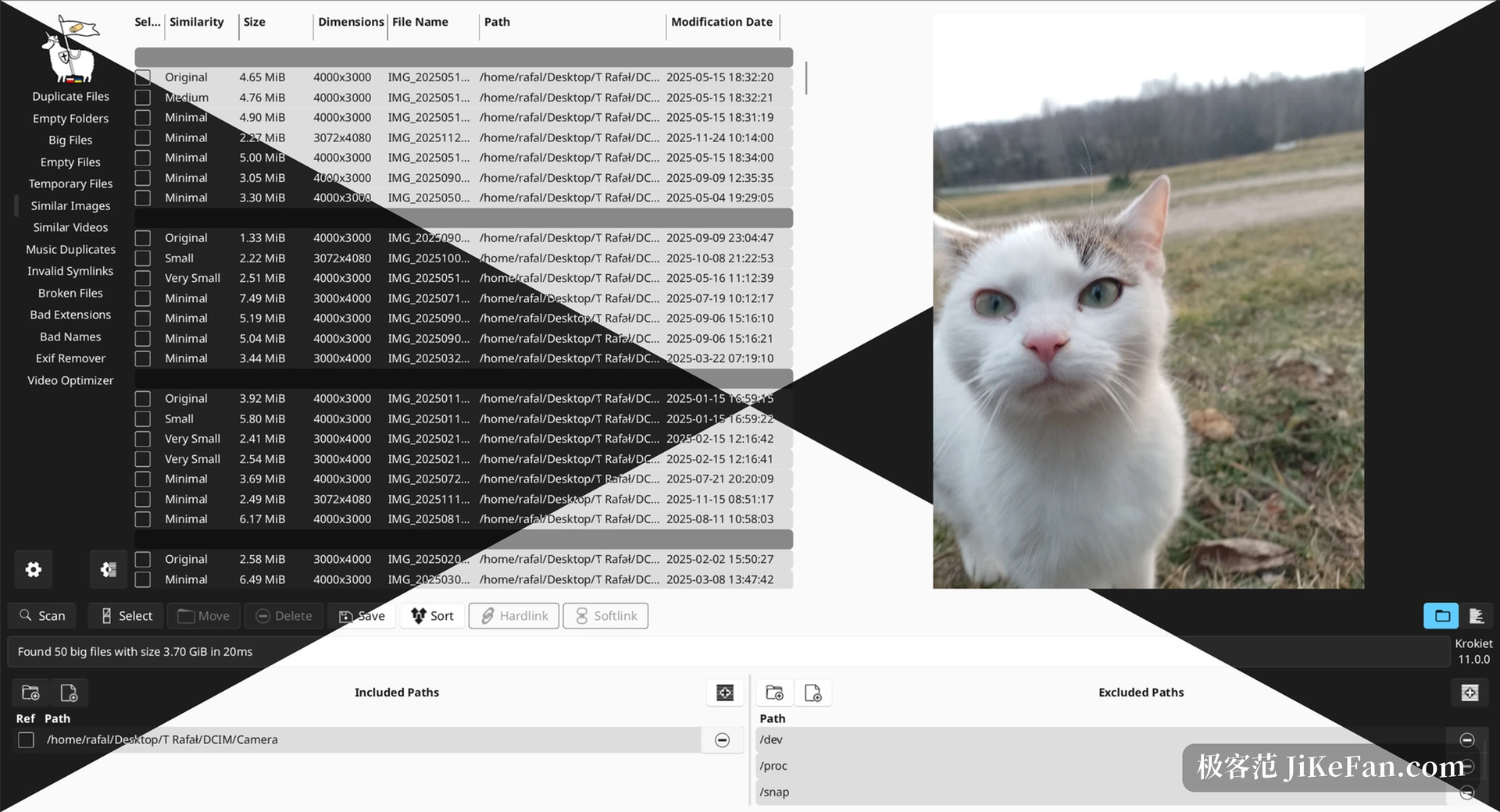
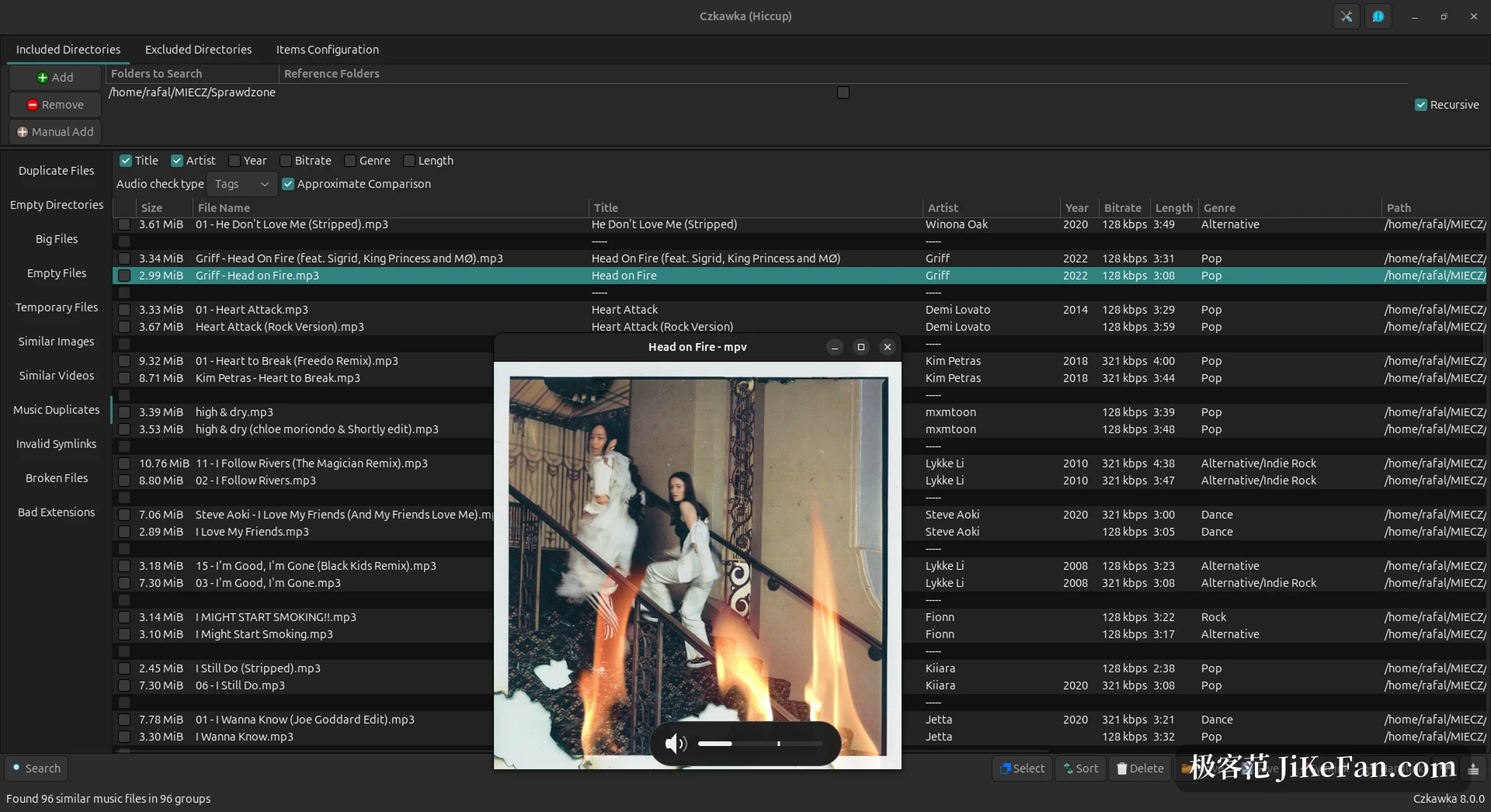
The sidebar lists fourteen tools. Duplicates compare by name, size or hash, and the strictest setting groups only files whose contents match exactly. Similar images run on perceptual hashes, so a photo that was scaled, watermarked or re-saved still turns up. Similar videos compare extracted frames and audio, while the same-music tool works from tags or reads the content straight through. A second group handles other rubbish: empty folders found by a recursive check, the largest files under a given path, zero-byte files, and temporary files filtered by extension.
A few of these get overlooked. Invalid symlinks point out links whose target has vanished, and the broken-file check asks whether a file still opens in the library that owns its format. A wrong-extension tool reads the file header to find the real type and flags names that disagree with the content. The EXIF remover strips capture data from photos in bulk, a video optimizer cuts static stretches or transcodes to a leaner codec, and a bad-filename tool lists names whose characters cause trouble on another system.
Broken files come in six kinds, and video needs ffmpeg
That last check deserves a paragraph of its own. The broken subcommand lets you tick the categories to verify. Images cover the common formats from jpg and png through tiff, gif, bmp, webp and avif; audio covers mp3, flac, wav, ogg, m4a and aac.
There is more beyond those two: PDF, archives, fonts, and markup such as JSON, XML, TOML, YAML or SVG. The archive category really unpacks and validates every entry, so an old backup of several hundred megabytes either turns out intact or proves to be a shell that will never open again.
Video takes a different road and leans on ffmpeg for probing or a full decode. Without ffmpeg installed, the similar-video, broken-video and video-optimizer tools stay unavailable while the other eleven keep working, and the Android build carries the same limit. Detection also depends on the parser behind each format, so a few files get called broken when they are healthy, and checking one by one before deleting anything remains a habit worth keeping.
Why the second scan is fast
The first scan reads every file and computes hashes, so it is slow by nature. Results land in a local cache holding hashes, image fingerprints and video signatures, meaning metadata rather than file contents, which keeps the cache size in hand. Scanning the same directories again reuses all of it and touches only what is new or changed. The project's claim is that the second run and every one after it should be far quicker than the first, and minutes collapsing into tens of seconds is a common outcome. Emptying the cache or rearranging a directory tree sends the program back for a full pass.
The scan runs on several threads, with work units handed to a parallel library that keeps every core busy. That library is written in memory-safe Rust and holds almost no unsafe code, which matters when a job reads and writes at high frequency for a long stretch. One cache side effect is worth remembering: never run two instances of the same tool at once, since they will damage the shared cache file, while different tools in parallel are harmless.
12.0.2 only touches the details
This release adds no tools and concentrates on places that used to fail quietly. The core once ignored a failed hardlink or symlink creation without a word; it now also reports a rollback rename that fails, and a visible error beats a silent one. The trash implementation moved from Tokio to async-io, dropping an extra runtime requirement.
AVIF licence metadata and the related tests were corrected, and the command line now rejects non-finite numbers such as NaN and infinity. Krokiet fixed a dialog whose button labels were cut off, and it can start a scan straight from command-line arguments, which spares a scheduled job any clicking.
A few things to know first
The author states plainly that Czkawka has no official website, that any site claiming to be official should be distrusted, and that the code repository is the only authority. That note pays off while searching, since mirror and download sites often carry builds several major versions behind. The program never goes online, sends no telemetry and carries no ads, and every analysis happens locally, which is why it gets recommended for sensitive material.
Prebuilt packages include a portable build that writes nothing to the registry and needs no separately installed runtime. HEIF, RAW or AVIF images require optional features compiled in, namely heif, libraw and libavif, which the prebuilt packages leave out and which are especially awkward to assemble on Windows. For common formats, the default build is enough.

It will not decide which file to keep. It spreads the duplicates, the look-alikes, the broken files and the wrong names out in groups, and the final tick and the final delete stay with you.