
Sigil 2.8.6 swaps the old CSS parser and fixes covers
Summary
Sigil 2.8.6 fixes the bug corrupting the opf manifest when a cover is replaced, swaps the old CSS parser for a Lexbor-based one and follows the current spec.
Recommend- Name
- Sigil
- Version
- 2.8.6
- Pricing
- Free
- Open source
- Open source
- Operating system
- WindowsmacOSLinux
- Website
- https://sigil-ebook.com/
- Updated
- 2026-11-19 16:42
Making an ebook ends with the cover: drop in a nicer image, export, done. Sigil 2.8.6 exists because of what that last step left behind, since swapping a cover inside Epub3 could corrupt the entries in the opf manifest. The program itself is a GPLv3 EPUB editor with builds for Windows, macOS and Linux, released on 2026-11-09 as a pure bug-fix version.
Code and result on the same screen
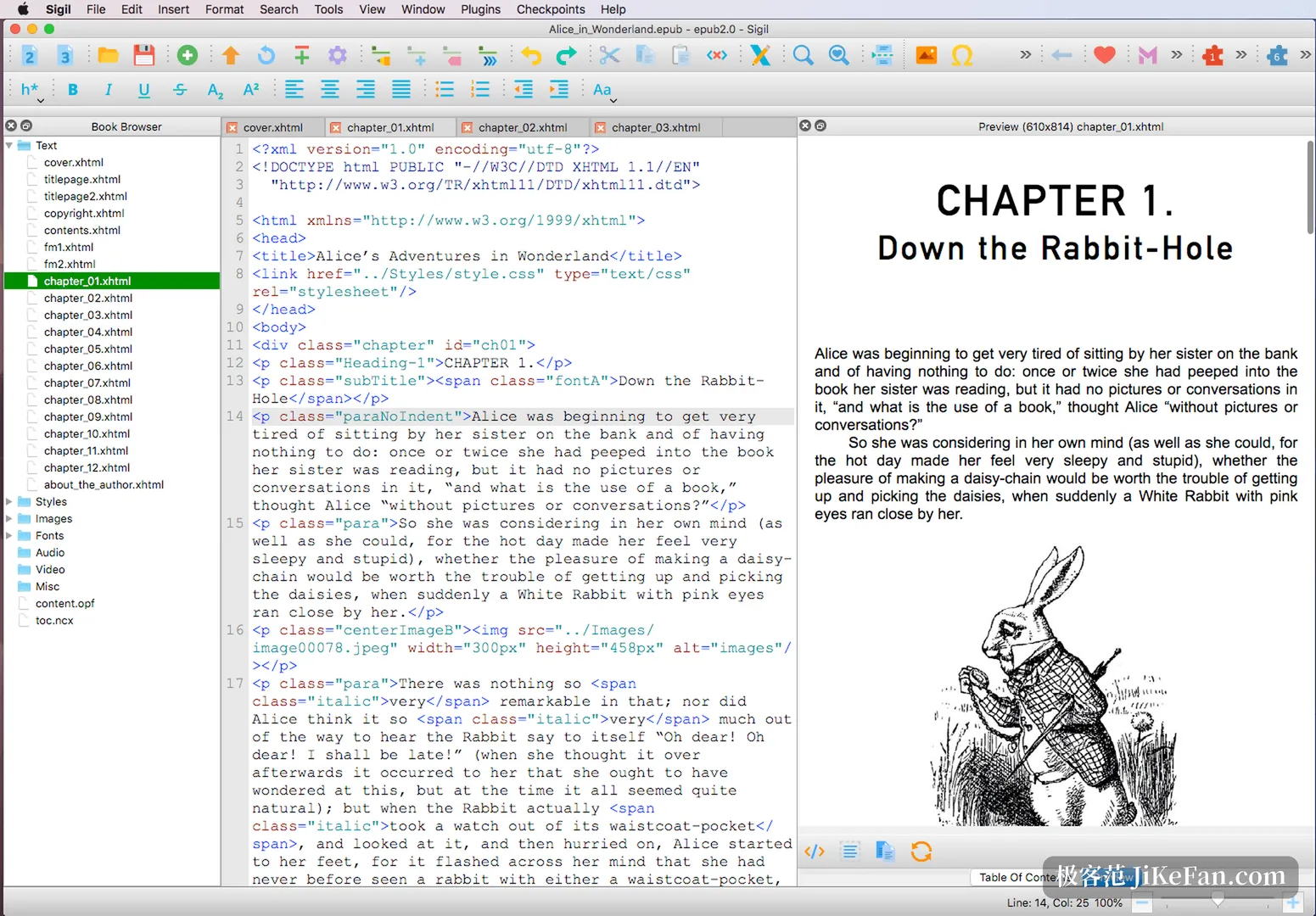
Open a book and the window splits into three. On the left the Book Browser groups resources under Text, Styles, Images, Fonts, Video and Misc, and a click opens one in the editor. The middle holds the code view with syntax highlighting, HTML and CSS coloured separately. A preview on the right renders the chapter the way a reader would, so changing one line of styling moves the result in place without switching windows.
The preview resizes, which answers the question of how far a narrow phone and a wide reader drift apart. All three columns drag, so you can squeeze the preview and hand the space to the code. A separate dark palette covers the evening shift.
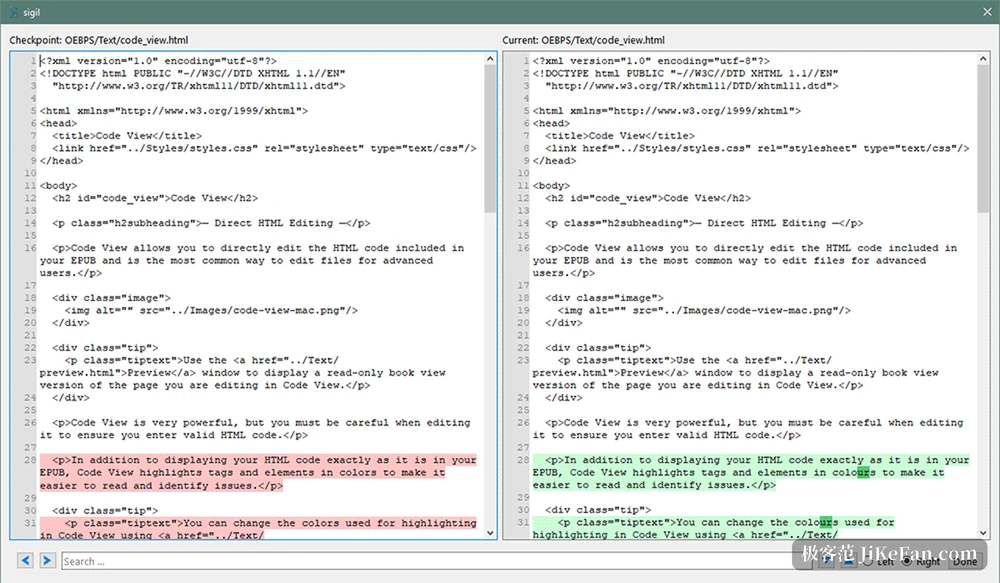
Before touching anything, take a checkpoint. Checkpoints photograph the current EPUB, and a bad edit restores to the previous one. Two checkpoints can also stand side by side as a diff with coloured lines, which makes it obvious who moved what.
Metadata lives in a window of its own. Author, contributors, publication date, rights, language and subject tags all sit in one table, several authors need no string stitching, and the cover is named there too and takes effect at once. The table of contents builds itself from heading levels, and chapters without a heading get flagged before generation.
The previous release replaced the old CSS parser
The Sigil release before this one worked lower down, replacing a CSS parser that had served for years with a modern one built on Lexbor, so syntax is judged against the current spec. A practical trick came in the same update: native CSS nesting is split into flat rules that older readers still open without breaking. Bulk image replacement and refreshing the book browser got faster in the same pass.
Plenty of details moved too. The image tab now reports intrinsic dimensions, the crop panel was rebuilt so rotate, zoom and crop happen in one place, and the special character dialog can be defined by a configuration file of your own, which saves typing entities by hand. Image support grew to avif and jxl, so a new format no longer needs converting first. The TOC editor selects several entries at once, and moving a whole block beats deleting rows one by one.
Following the specification forward
The specification work came along as well. Meta tags now match the epub version in use, an SVG cover writes both href and xlink:href, and Epub3 no longer embeds the old epub2 cover metadata. Creating and deleting that metadata moved into the Tools menu, a manual switch for anyone who still needs older devices, instead of requiring a trip through code.
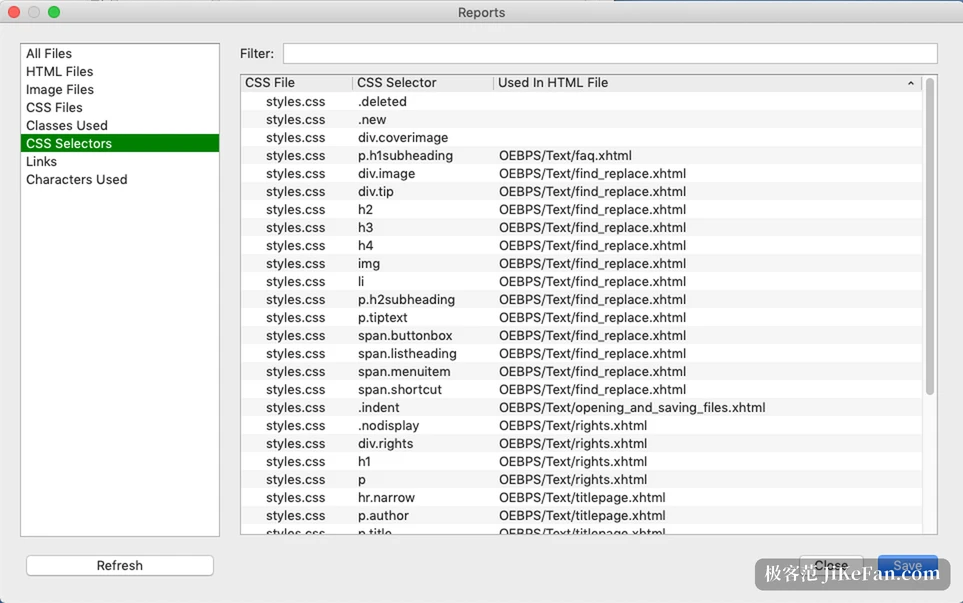
A finished book needs a check. Well-Formed Check under Tools scans for structural problems and points at the location, a stylesheet can go to the W3C validator on its own, and everything lands in Validation Results. For a finer comb, install a plugin such as EpubCheck or FlightCrew; plugins are written in Python and run over the whole book. Sigil also ships Reports, which answers a different question: which CSS selectors nothing uses, how large the images are and where links point, and a pass through it can shrink a file noticeably.
Bulk work has a home too. The plugin manager lists what is installed, so TagMechanic rewrites tags by rule and EpubCheck runs compliance. Search and replace takes regular expressions, and a Dry Run previews every hit before anything is committed. Fragments saved as Clips drop back in as a block, which pays off on footnotes and copyright pages.
Two small details are worth knowing up front. The Linux build arrives as an AppImage built on Ubuntu 22.04 and asks for glibc 2.35 at minimum, so older systems should check the version first. PageEdit, from the same organisation, is a WYSIWYG XHTML editor, and for rewriting the body of a single page it beats shoving tags around in the code view.
It will not turn a manuscript into a book for you. It puts the three jobs into one window instead: change a style, see the result, run the check, all on a single screen.