
Immersive Translate puts the translation under the original, not in its place
Summary
A browser extension that turns a foreign page into two layers: the original paragraph stays where it is and the translation sits beneath it. PDFs, subtitles and online meetings are covered too, and the free allowance is enough for personal reading.
Recommend- Name
- Immersive Translate
- Version
- 20260917
- Open source
- Proprietary
- Operating system
- Web
- Website
- https://immersivetranslate.com/
- Updated
- 2026-10-06 20:47
It stacks the translation instead of swapping the text
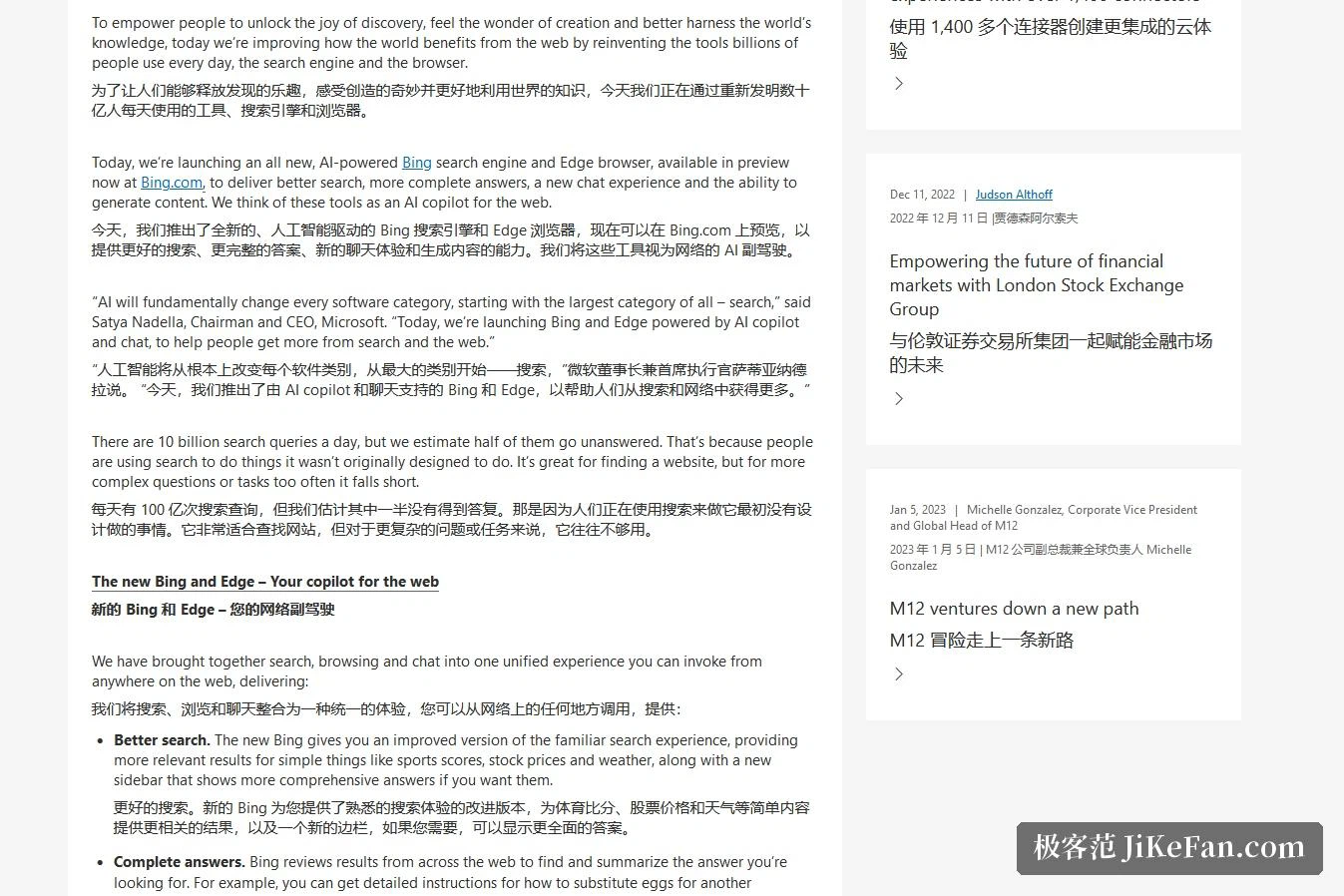
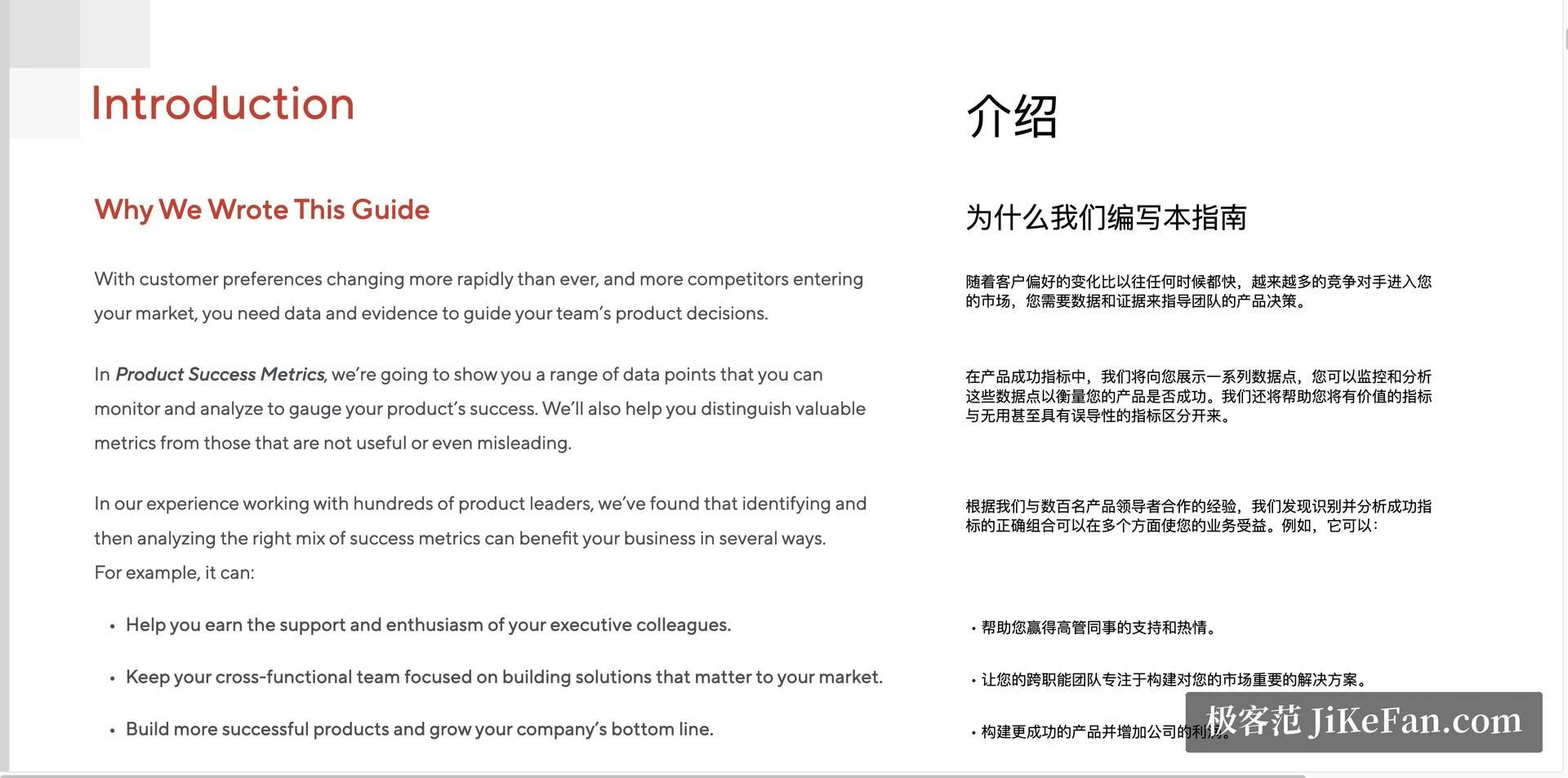
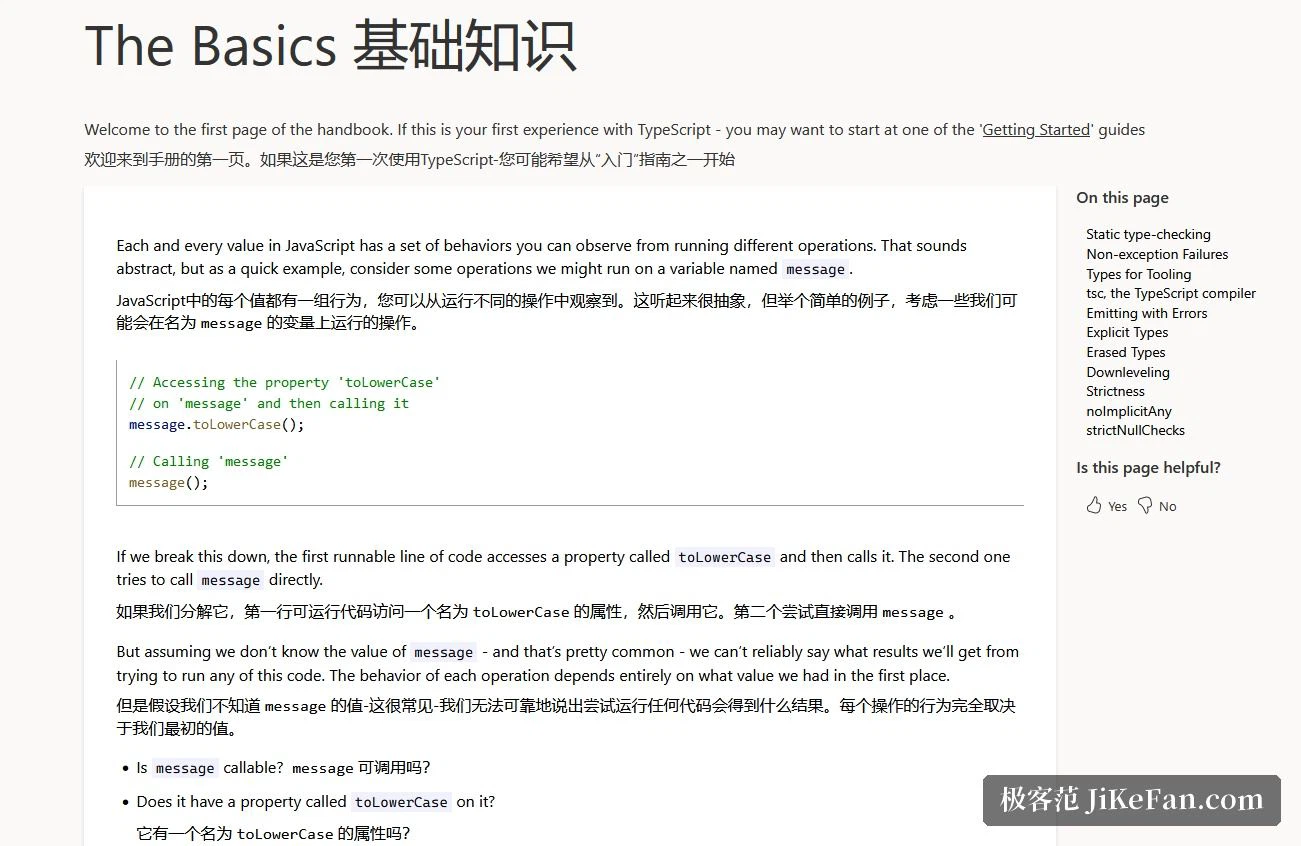
The translation built into a browser usually works by substitution. You press a button, the foreign text vanishes, and the translated text takes its place. Immersive Translate, a browser extension, does something else: every original paragraph stays exactly where it was and the translation is inserted beneath it, so the page ends up in two layers with the source on top. The official description calls it an AI-driven bilingual translation extension for web pages, and the word bilingual is the whole design.
The official documentation describes the mechanism as content detection followed by paragraph-level translation. The extension looks for the main content area of a page, then works through it one paragraph at a time. A paragraph, not a sentence, is treated as the smallest unit. The reason is context: a sentence lifted out of a page easily loses the thread, while a paragraph keeps enough of the argument that a reader can check the translation against the original as they go.
Documents, subtitles and online meetings
Web pages are only the entry point. Document translation handles PDF, ePub, HTML, TXT, Docx, Markdown and subtitle files, and it preserves the original layout rather than flattening everything into plain text. The result can be the bilingual pair or the translated text alone. A scanned PDF can be run through OCR first and translated afterwards, which is what makes academic papers and contracts usable at all, since both usually arrive as images of pages.
Video is the second area. The extension produces real-time bilingual subtitles for online video. The official home page claims more than 100 platforms, while the documentation page speaks of over 50 mainstream foreign video sites; YouTube and Netflix are named in both places. A source with no subtitle track can still be translated, because the text is recognised from the audio rather than read from captions. Online meetings are covered as well, with Zoom, Google Meet and Microsoft Teams on the list. Images and comics go through OCR plus image restoration, so the translated text lands in the picture without wrecking the artwork around it.
The small features that change how you read
Selection translation is the one most people meet first. Highlight a word or a phrase and the translation appears with its pronunciation, without a page change or a tab to close afterwards. Hover translation is a different idea, aimed at close reading: park the pointer on a paragraph, press the shortcut, and that paragraph's translation appears or disappears. Read the original first, then look.
Input box translation is more situational. Type in any text field, press the space bar three times, and what you wrote is translated into the target language. English is the default and can be changed. It helps when searching in a language you do not speak, and when writing a prompt for an AI model in wording you are not sure of.
Engines and language coverage
The number of engines on offer is where tools of this kind really differ. The official home page says more than 20 AI translation engines are built in, naming ChatGPT, DeepL, Deepseek and Gemini among them. The documentation page instead describes support for more than 30 translation services and lists DeepL, OpenAI, Microsoft Translator, Google Translate and Tencent Translate. The two figures do not agree, but they point the same way: there is a long list to choose from, and you can supply your own API key for the services that accept one. On languages, the official figure is mutual translation across more than 100 languages.
What the free allowance actually covers
The pricing page states that Immersive Translate can be used entirely free, and that the allowance is meant for ordinary personal reading and study. Free users still get good output, but there is a sensible daily ceiling on translation requests, and registering raises it. For readers who want professional services such as DeepL, OpenAI or Claude, a separate plan goes up to 50 million tokens a month. Paying members are not affected by the free-tier policy and get a higher request frequency.
One caveat about scope. If you are reading papers, checking sources and following foreign-language news for yourself, the free allowance is usually enough. If you plan to use it inside a company or on commercial work over the long term, confirm that the licence terms and the quota policy cover the way you intend to use it before you subscribe to anything.

Where it runs, and the open-source question
It runs on Chrome, Edge, Safari and Firefox. The official installation routes are the browser stores plus the Apple App Store, and the iOS and Android apps offer the same experience on mobile.
One point deserves a plain statement. Immersive Translate is not open-source software. Its official GitHub repository exists to publish releases and collect feedback; the source code is not there, and the earlier open-source project was archived in January 2023. That is not a defect, but it belongs in the decision, because it means the product depends on the vendor continuing to run it. On privacy, the official commitment is that translated content is not retained, is not used for model training, and that requests are encrypted throughout, with ISO 27001 and ISO 27701 certification listed alongside.
A last practical note: fluent machine output is still no substitute for a human read. With contracts and legal documents, treat the translation as an aid to understanding and let the original govern.
The value of a translation extension is rarely about how well it translates. It is about whether you are still willing to read the original. Put the translation beside the source and the reader stops being led by the translation; what the tool changes in the end is a reading habit, not a sentence.