
Zotero 10.0.6: an open reference manager that captures from the page you are reading
Summary
An open source tool for collecting, organising, annotating, citing and sharing research material. It reads citation data off a web page in one click, inserts citations while you write and rebuilds the bibliography, and keeps PDF annotations tied to the item. Version 10.0.6, AGPL.
Recommend- Name
- Zotero
- Version
- 10.0.6
- Pricing
- Free
- Open source
- Open source
- Operating system
- WindowsmacOSLinux
- Website
- https://www.zotero.org/
- Updated
- 2026-10-15 21:52
The slow part of writing a paper is rarely the writing. It is dragging every citation into one consistent shape.
From finding a source to citing it in a sentence
Finding material is not the awkward part. What comes after is. A title, authors, journal and year seen on a page have to be copied into notes by hand. The same source cited in three chapters has to look identical each time. And when a journal asks for a different style, every in-text citation and the whole list at the end has to change with it. None of these steps is hard alone; stacked up, they eat a surprising amount of time.
Zotero takes that stretch of work. The official summary is that it helps collect, organise, annotate, cite and share research material, and those five verbs map onto the whole path from hunting sources to a finished draft, which is why it behaves more like a process tool than a single feature. It is free and open, released under AGPL.
The entry point sits at collection. The documentation explains that while browsing a book, an article or other material, the tool recognises the page type and pulls the citation data in one click, filling title, authors, year and source automatically. What that removes is copying fields off a page and checking their formatting afterwards. A browser extension handles this layer, deciding whether the page is a journal article, a book or something else, and sending the matching fields to the library.
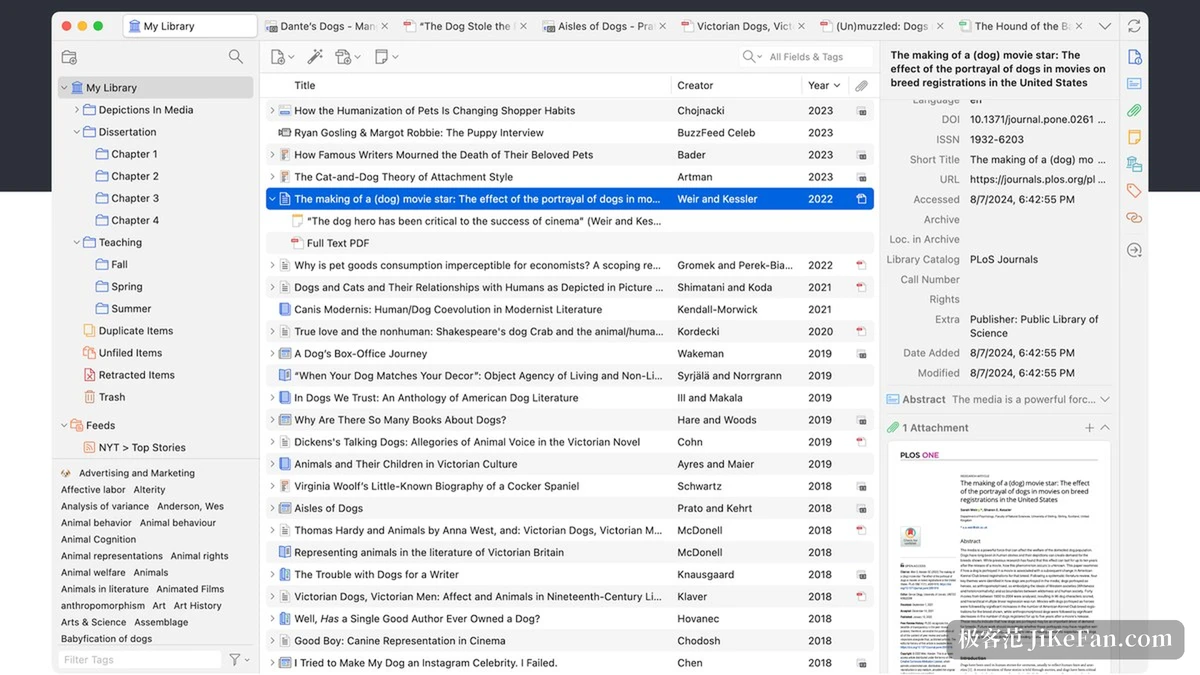
Organising, annotating and citing
Once a library holds several hundred items, finding one becomes the problem. Items can be sorted into collections and tagged, and the whole library is searchable by keyword, including text inside attached PDFs. Reading happens in the same place: PDFs open inside the tool, highlights and notes can be written directly, and annotations stay bound to the item. Returning to a passage while drafting is far quicker than hunting through folders for a file and then for the line you once marked.
The real saving arrives at the writing stage. The integration with word processors inserts citations in the text and generates the bibliography automatically. Insert one and the list at the end updates; reorder citations or switch styles and the formatting follows without hand editing each entry. For anyone who has to reformat a paper for a second journal, that single step is the most valuable thing the software does.
Items and annotations synchronise across machines. A free account comes with an allowance, and beyond that a user can choose another storage arrangement, which matters when several computers take turns on the same project and both need to see the same thing.
Version and extensions
The current release is 10.0.6. The desktop application and the browser extension carry their own version numbers, so both are worth a glance when updating. Before a major upgrade, back up the data directory, because that is the one part which is genuinely hard to reconstruct.
Extra capability comes from plugins. There is a sizeable community ecosystem covering interface tweaks, citation styles and connections to outside tools. Plugins are maintained on their own schedules, so checking that one keeps up with the current major version saves trouble later; a plugin going dead after an update is the most common source of annoyance with tools of this kind.
Item | Official information |
|---|---|
Current version | 10.0.6 |
Platforms | Windows, macOS, Linux, plus mobile |
Main abilities | Page capture, library organisation, PDF reading and annotation, citation insertion, bibliography |
Sync | Items and annotations across devices |
Extensions | Community plugin ecosystem |
Licence | AGPL |
Hand the formatting to the tool and keep the thinking for yourself.
Practical notes: settle the rules for collections and tags at the start, when there are few items and the cost of deciding is lowest; check authors and years after capturing, since page quality varies and a field sometimes needs fixing by hand; and export the library to a backup file regularly so that a damaged data directory is an inconvenience rather than a restart.