
HaoZip: over fifty archive formats, and a look inside before unpacking
Summary
A permanently free archiver for packing and unpacking, with no payment gate for personal or business use. It opens more than fifty formats directly without an add-on, runs multi-threaded, encrypts with AES-256, repairs damaged archives and previews the images inside one without extracting anything.
Recommend- Name
- HaoZip
- Version
- 6.6.0.11316
- Pricing
- Free
- Open source
- Proprietary
- Operating system
- Windows
- Website
- http://haozip.com
- Updated
- 2026-10-05 11:37
A free archiver that has been on the list for years
An archive tool is among the first things installed on a new machine and among the last anyone thinks about afterwards, which is exactly why the category has become tiresome: a fair number of the programs either ask for money or hand over a cut-down version and keep the useful half behind a purchase. HaoZip takes the other line. It comes from a team in China and is positioned as permanently free, with no payment threshold for personal or business use, and by September 2026 it had reached version 6.6.0.11316. Among the domestic archivers of its kind it is one of the more widely installed, which for a utility of this sort is close to the only reputation that counts: nobody recommends a packer, people simply keep using the one that never got in the way.
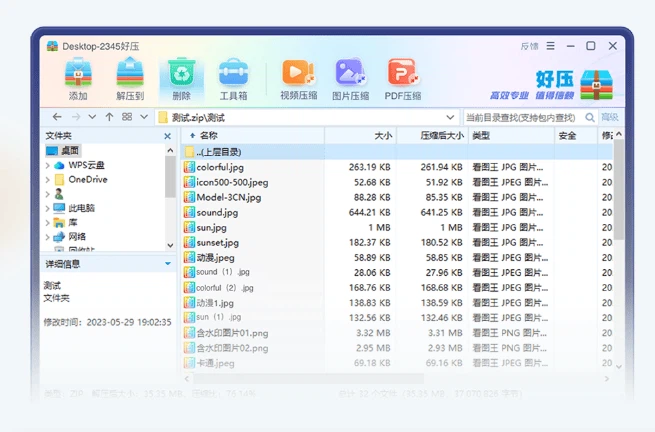
Over fifty formats, without a helper program
Compatibility is where it is strongest. ZIP, 7Z, RAR, ISO and a good number of the rarer packaging formats all open directly, with no add-on component to fetch first, and the newer revisions of the compression used inside those containers are covered fully rather than partly. Creating an archive is equally unceremonious: the common formats are offered as targets, and both splitting an archive across several volumes and building a self-extracting file are done from the right-click menu. That last pair is the sort of thing a person needs twice a year, and precisely then having to go looking for a second utility is the most irritating.
Several threads, so a large file does not hold up the day
Both packing and unpacking run over multiple threads, and the algorithm is matched to the type of file being handled, which is how the balance between a smaller result and a quicker result gets struck without the person having to choose between them. The figure the publisher puts on it is that a one gigabyte archive unpacks in roughly twenty seconds. That will vary with the machine, but the direction of it is right, and for anyone who regularly bundles video or image material there is also batch compression and a lighter-weight conversion route: shrink first, send second, and the waiting happens once instead of at both ends of the line.
More than a packer: a small box of file tools
Four extra pieces sit alongside the main job, and all four are the sort of thing one otherwise installs separately. Preview inside the archive lets images and documents be looked through without unpacking anything, which is the whole difference between checking one file and extracting two gigabytes in order to find it. A repair path attempts to salvage an archive damaged by an interrupted transfer or a storage fault, and that is worth knowing exists before the morning it is needed. Encryption with AES-256 keys protects an archive of sensitive material on its way out of the building. The ordinary housekeeping is present as well: checksums for confirming that a file arrived intact, batch renaming, and batch conversion between formats.
Light on hardware, and there is a version for the Mac
The demands on the machine are modest and the memory footprint is low, so an older computer still runs it smoothly, which is not a small point. A utility invoked in a hurry, with a deadline already slipping, should not be the reason the machine stalls. The interface accepts skins, and both the right-click menu and the keyboard shortcuts can be rearranged, so the two or three commands actually used can be put where the hand already expects them. Beyond the Windows build there is a version for the Mac as well, and it carries the core of the thing: packing, unpacking and encryption.
Who it suits
Office workers and students who regularly bundle a contract or course material and send it out fit it immediately. So do ordinary users who keep receiving archives in formats they did not choose and want nothing more than to open them. And so do businesses that have to put one archiver on a row of office machines and would rather not negotiate licences in order to do it. It stays free for personal and business use alike, and that single sentence is the short version of the whole argument.