
UltraISO: change an image without unpacking it first
Summary
UltraISO treats a disc image as a folder: files go in, come out and get renamed without unpacking and repacking. It converts more than thirty image formats, writes bootable media and carries a virtual drive.
Recommend- Name
- UltraISO
- Version
- 9.7.6.3860
- Pricing
- Paid
- Open source
- Proprietary
- Operating system
- Windows
- Updated
- 2026-10-04 20:58
An old hand at disc images
UltraISO handles one family of object and handles it thoroughly: images of optical discs, and what can be done with them, which is make, edit, convert, burn and mount. Its own description is a tool to extract, create, edit and convert CD and DVD image files, and that is a fair list. An existing image can be opened and changed, and a new one can be produced from a physical disc or from a folder on the local drive, which covers both the copying and the assembling side of the job.
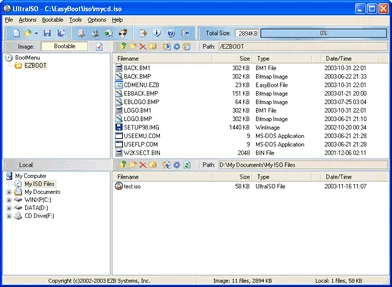
An image opens like a folder
The feature that gets mentioned first is direct editing. Open an ISO and the files inside can be added, deleted and renamed much as they would be in a file manager, without unpacking the image to a directory and packing it up again afterwards. For the two jobs that come up most, patching a system installation image and dropping a missing driver into a rescue disc, that saves a whole round of copying tens of gigabytes onto a working drive. The two-pane interface accepts drag and drop, and the learning curve is short enough that nobody needs a manual to move a file from one side to the other.
Formats, and media that boots
Format coverage is the other basic skill. More than thirty image formats, among them ISO, BIN with CUE, NRG, MDF and the CCD, IMG and SUB set, convert into one another and can be normalised to a standard ISO. Writing bootable optical media and bootable USB sticks is on the feature list as well, boot information can be edited, and that is the reason the tool has stayed in use for so long among people who install systems and keep machines running. A virtual drive is built in too: mount an image and its contents are readable straight away, with no need to burn a physical disc to look inside.
Why boot information is the part that matters
An image that merely holds files is easy to rebuild; an image that starts a machine is not. The boot record has to survive the edit, the partition layout has to remain what the firmware expects, and a stray change can turn a working installer into a coaster. Handling that inside the same window where the files are being moved is what separates this kind of tool from a general archiver, and it is why the tool keeps appearing in instructions for building rescue media.
Versions, price and the trial
The download offered in September 2026 was the nine seven line, the installer under five megabytes, and the interface speaks several languages including simplified Chinese. It is commercial software listed at about thirty dollars, with a trial available. The trial caps the size of the image it will handle at roughly three hundred megabytes, which is enough to judge the interface and not enough to finish a real system image, so the decision comes quickly either way.
Where it still earns its place
For the occasional job, editing one ISO, archiving an old optical disc into an image, or making a stick that boots, a tool that opens the image and lets it be changed, and converts whatever format arrives, remains convenient. It is small, the interface is plain, and what the licence buys is the time not spent hunting for three separate utilities to do three steps of one task.