
7-Zip: A Free Archiver With the 7z Format and AES-256 Encryption
Summary
7-Zip is a free, open-source archiver whose 7z format, built on LZMA and LZMA2, compresses better than ZIP while staying compatible with the usual archive types.
Recommend- Name
- 7-Zip
- Version
- 26.03
- Pricing
- Free
- Open source
- Open source
- Website
- https://sparanoid.com/lab/7z/
- Updated
- 2026-10-06 21:02
A compressor built around one algorithm
7-Zip is a free, open-source archiver, and what it is known for is the compression ratio. Its own 7z format is built on the LZMA and LZMA2 algorithms, and the result is an archive that comes out smaller than a ZIP of the same content. Compared with ZIP and GZIP, the difference runs to roughly two to ten percent, which is the kind of margin that matters when a file is being sent over a slow connection rather than sitting on a disk.
Compression and extraction cover 7z, XZ, BZIP2, GZIP, TAR, ZIP and WIM. The list of formats that can be read but not written is much longer, and it is the reason a single tool can replace several: AR, ARJ, CAB, CHM, CPIO, CramFS, DMG, EXT, FAT, GPT, HFS, IHEX, ISO, LZH, LZMA, MBR, MSI, NSIS, NTFS, QCOW2, RAR, RPM, SquashFS, UDF, UEFI, VDI, VHD, VMDK, WIM, XAR and Z. Several of those are not archives in the usual sense at all — disk images, file systems and installer packages — and being able to open them without mounting anything saves a step when the contents only need to be inspected. Read as categories instead of as a list, they are disk images (DMG, ISO, VDI, VHD, VMDK, QCOW2), file systems (EXT, FAT, NTFS, HFS, SquashFS, CramFS), boot and partition structures (MBR, GPT, UEFI), installer and help packages (MSI, NSIS, CAB, CHM, IHEX) and older archive formats (AR, ARJ, LZH, RAR, RPM, XAR, Z, UDF).
Encryption, self-extracting archives and the shell
AES-256 encryption is available for both 7z and ZIP, so an archive can be protected without leaving the tool. The 7z format can also produce self-extracting archives, which is the practical way to send something to someone who should not have to install anything first.
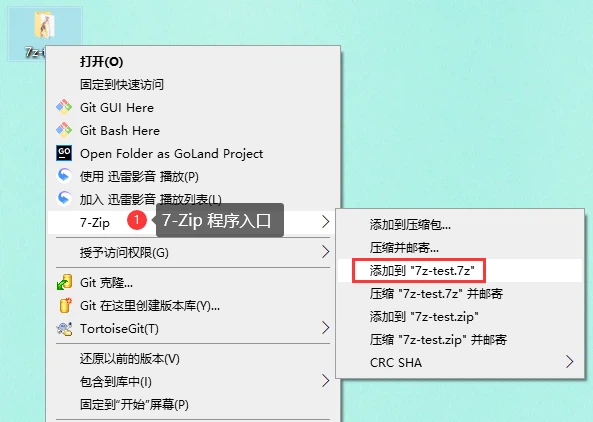
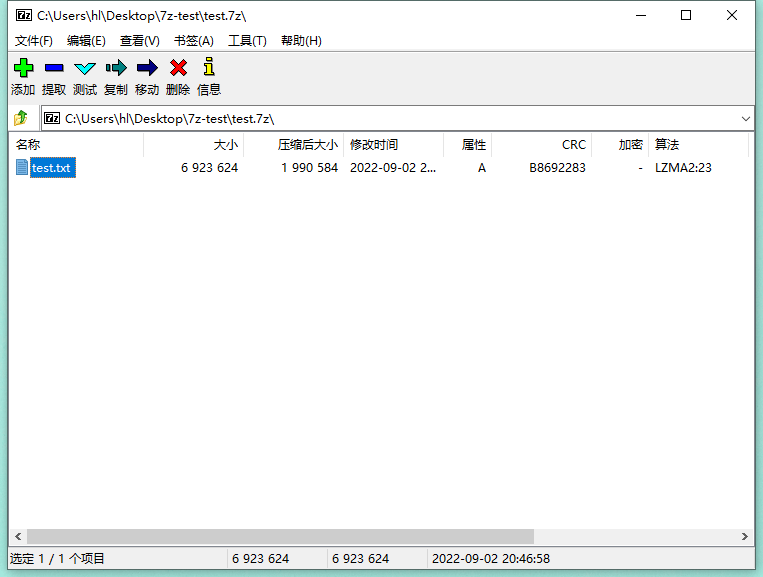
On Windows the program integrates with the file explorer, so compressing or extracting is available from the context menu rather than from a separate window. Behind that there is a full file manager, and a command-line version for work that has to be scripted; a FAR Manager plugin exists for people who live in that file manager. The interface is translated into 87 languages.
Platforms
The Windows build covers 10, 8, 7, Vista and XP, along with the server releases from 2016 back to 2000. For Linux and other Posix systems there is p7zip, a command-line port of the same engine, and the project keeps forums and a bug tracker on SourceForge where system requirements are also documented.
How well it compresses text
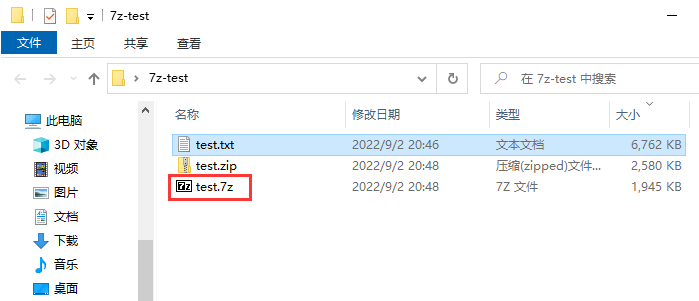
Tests on text files come out well: the archive is noticeably smaller than what a general ZIP produces for the same input. That is the case LZMA was designed for, and it is also where the trade-off shows — the extra ratio is paid for in compression time, which is why the faster settings exist.
Licence
7-Zip is open source. Most of the code is published under the GNU LGPL, some parts under the BSD 3-clause licence, and a small part is limited by the unRAR licence. It can be used on any computer, including computers used for commercial work, which is the part that answers the question an office usually asks first.
Who it suits
Anyone who receives archives from other people needs something that opens everything, and this is the tool that does that without a licence prompt. Anyone who sends large files regularly gets a smaller attachment from the same window. And anyone who has to compress a folder on a schedule can call the command-line version from a script instead of clicking through a dialog.