
ZSClip 1.0.13: a clipboard manager that drags out files
Summary
ZSClip 1.0.13 keeps text, images and files in a local SQLite store, pastes them by typing vv, and drags any record out as a real file on Windows.
Recommend- Name
- ZSClip
- Version
- 1.0.13
- Pricing
- Free
- Open source
- Open source
- Operating system
- WindowsmacOSLinux
- Updated
- 2026-11-10 23:00
Copying something is rarely about pasting it once. Usually the paste comes later, and the system clipboard remembers only the last item, so finding last week's quote, screenshot or contract attachment means scrolling back through a chat. ZSClip fills that gap. It is a clipboard tool written in Rust, drawn with native Win32 windows, and released as version 1.0.13 on 8 November 2026 under the GPL licence.
Windows is where the native integration runs deepest, though macOS and Linux builds exist as well. ZSClip describes itself as a resident local office toolbox rather than a scrolling history list. Everything it catches stays inside a local SQLite database. No account sits in the middle, and no server does either.
History and phrases are two different things
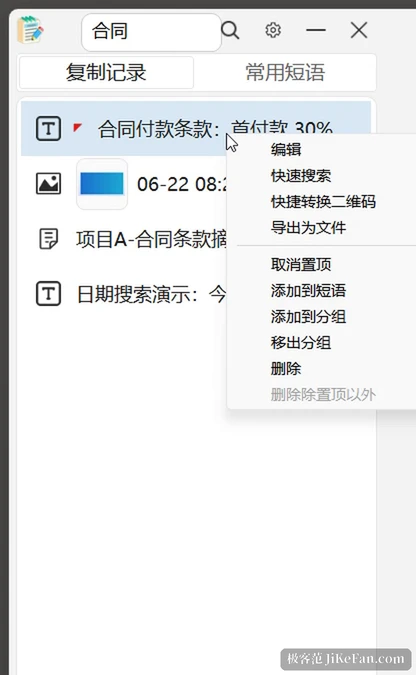
The main window carries two tabs. History is the stream the app listens for, with text, images and files mixed together. Phrases are templates you save on purpose, quoting language, addresses, standard replies, and they survive the stream. Records can be pinned, sorted into groups, and searched by keyword or date range. The hotkey opens a narrow quick window first, so typing is barely interrupted, and the main window is for tidying up afterwards.
One detail is easy to miss. A file entry pastes through the native Windows file clipboard instead of dropping a path as text, so a record dragged into Explorer arrives as a file you can open rather than a line of characters.
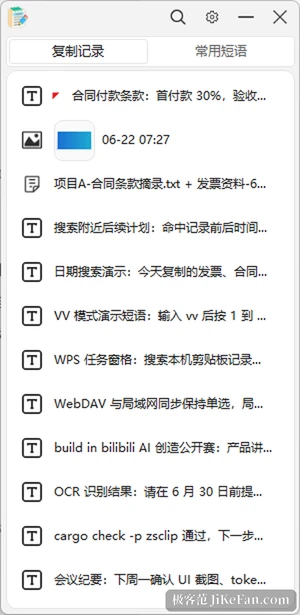
Type vv and the popup appears at the caret
The feature that actually changes how fast you work is VV mode. With it on, typing two v characters in any input field brings up a candidate window next to the input method's own list, and a digit from 1 to 9 pastes that record. No window switching, no chord to memorise, hands never leave the keyboard. The popup also changes group on the spot, and VV can be restricted to history or to phrases so you are not hunting an address inside a pile of screenshots.
What that mechanism costs is a resident keyboard listener, which is why every decision happens locally and the records never leave the machine's database. A separate setting switches the listener on or off. Turn it off and no hook stays installed.
It has to drag out to be real material
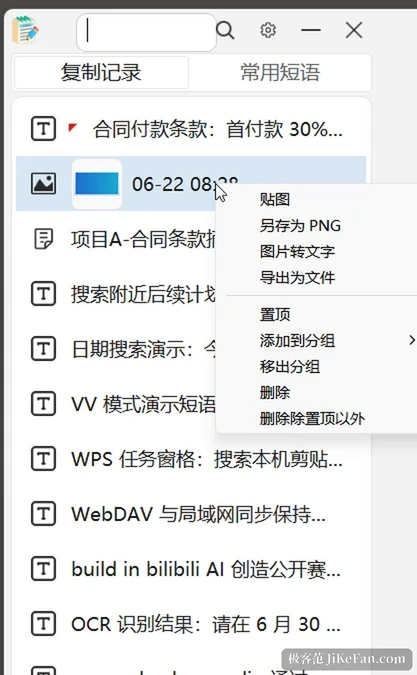
Text, image and file records all drag out, and wherever the mouse is released a real file appears instead of a reference. Images have a second route: pin one, and the screenshot floats above other windows, which beats switching back and forth while comparing two documents. Image rows in the list show a thumbnail, so a glance identifies the right one.
The clumsy road from Excel to Word
Plenty of people repeat the same chore every month: a column of client names and a column of addresses in Excel, copied row by row into a Word template, saved after every edit. The built-in super mail merge exists for exactly that. Reading Excel, it detects the sheet, the header row and the data rows, then inserts field codes into Word, and it offers both a mail merge mode and a fill-one-row-at-a-time mode. The same idea reaches WPS through a task pane that searches local text records and inserts them into the current document.
These parts are Windows only, and the documentation states the tested scope plainly, so treat them as usable and still being polished.
Sync is an option, not a default
Multi device sync offers three settings: off, WebDAV, or local network, and the first two never run together. The local network route is off by default and starts its discovery and transfer service only once you pick it. Pairing goes through a QR code or a manually typed address. Text, images under 10MB and small files can sync automatically, and remote content can either land in history or overwrite the system clipboard. Turning the scheme off releases the threads and ports, so nothing keeps running quietly in the background.
Loading was rebuilt as well. The list is fetched a page at a time, the virtual list draws only the rows on screen, the next page arrives on a background thread, and bodies and file paths are filled in when needed. With tens of thousands of records the window still opens at the same speed, which is the part of such tools easiest to neglect and hardest to live without.
Who needs it
Support and operations teams gain the most directly: the same replies go out all day, and phrases plus VV cut one answer down to two or three keys. People who collect material come next, because screenshots, copy and attachments share one timeline and leave it as files. Anyone building reports will like the mail merge section, polished or not.
For someone who only wants a few dozen more clipboard entries, the history panel built into the system is enough. What ZSClip adds is a pipeline that can be reused rather than a longer list.
- Version
- 1.0.13, released 8 November 2026.
- Licence
- GPL, source on GitHub.
- Platforms
- Windows in full; macOS and Linux builds alongside.
- Price
- Free.