
floci 2.4: four clouds, one laptop, four ports
Summary
floci 2.4 runs four clouds locally: 24 millisecond startup, 13 MiB idle, MIT licence, no credentials, 514 changes deepening EC2 and CloudFormation.
Recommend- Name
- floci
- Version
- 2.4
- Pricing
- Free
- Open source
- Open source
- Operating system
- WindowsmacOSLinux
- Website
- https://floci.io/
- Updated
- 2026-11-09 16:57
floci is a tool that runs four cloud emulators on your own machine. AWS, Azure, GCP and OCI each get a separate program, a separate port and a separate native binary under the MIT licence, and the four are independent of one another, so you can start one or run all of them side by side. No cloud account, no auth token, no feature gating, no telemetry; anything that runs Docker can carry it, and Windows, macOS and Linux use the same pieces. Version 2.4 arrived with more than five hundred changes, almost all of them in the depth of service coverage.
Four clouds, four programs, four ports
The mapping is plain. The main program answers for AWS on 4566, the Azure build on 4577, the GCP build on 4588 and the OCI build on 4599. One container, one port, one protocol set per cloud, and no data crosses over. For anyone touching several clouds at once, that layout is more useful than a feature list: a test script changes its endpoint and runs again on another cloud, with no virtual machine and no account for each.
The name comes from a cloud formation shaped like popcorn, cirrocumulus floccus. The naming fits the ambition. Nothing here tries to move a cloud onto your desk; what moves is the interface, so code can be exercised at small scale first.
The seconds a native binary saves
The emulator is built with Quarkus Native on top of GraalVM's Mandrel distribution, so what ships is machine code rather than a package running inside a JVM. The published figures are 24 milliseconds to a cold start, 13 MiB at idle and an image of about 90 MB. For someone writing code the numbers only mean fast; for a pipeline they mean something else: a fresh environment per job, torn down afterwards, which is only sane when the start is cheap enough for twenty parallel jobs.
The usual approach in this class of tool is a full service process inside a container, seconds to tens of seconds to start, several hundred MB resident, and once the parallel matrix arrives it fights over memory and waits on timeouts. Native compilation pushes both numbers down. The price is a slow build and extra reflection configuration for some dependencies, the standing trade of every ahead-of-time scheme.
Protocol fidelity held up by real engines
The place an emulator usually fails is looking right: same data structures, same status codes, different behaviour, all green locally, broken within the first hour in production. floci's answer is not to stub things out but to hand the heavy data services to real engines. Every Lambda invocation runs in a real Docker container with the runtime variables of Node.js, Python, Java and Go lined up with the cloud. RDS starts actual PostgreSQL, MySQL or MariaDB with a full lifecycle and snapshot restore, speaking JDBC traffic and IAM database authentication. ElastiCache is a real Redis container with floci in front as a SigV4 proxy, MSK sits on Redpanda, Athena queries land in a DuckDB sidecar, and EC2 RunInstances pulls up containers with SSH key injection, UserData execution and both generations of the IMDS metadata service.
Two details at the protocol level deserve their own paragraph. IAM is not decorative: Lambda, RDS, ECS, EC2, MSK, ECR and OpenSearch all perform full SigV4 validation, so a policy mistake fails on your own machine instead of surfacing in production. The project maintains 1925 AWS SDK compatibility tests and reports that all of them pass. That is a self-reported number rather than a third-party audit, but it is enough to judge whether this environment can replace the one you have.
One console, four runtimes
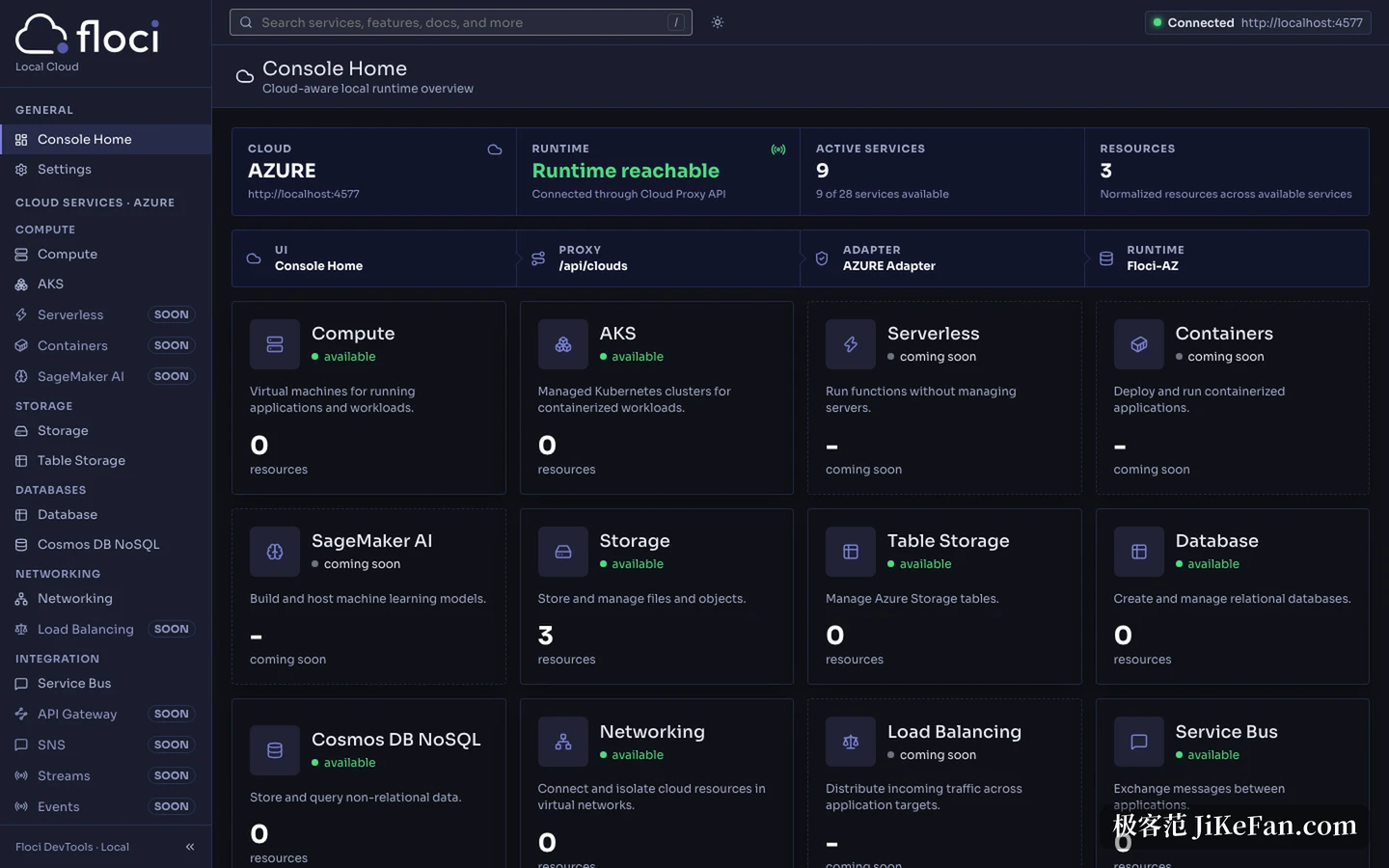
A graphical front end exists too, and its structure is more considered than it looks. The browser UI is built with React and Vite, listens on 4500 and accepts only requests that begin with /api. Behind it a Cloud Proxy API written with Bun and Hono listens on 4501 and routes by cloud to four adapters, AWS, Azure, GCP and OCI. The adapters translate into each runtime's own protocol and land on the ports from 4566 to 4599. A line in the documentation states the division: the UI does not know the cloud, the proxy does not know the implementation, the adapter translates, the runtime executes.
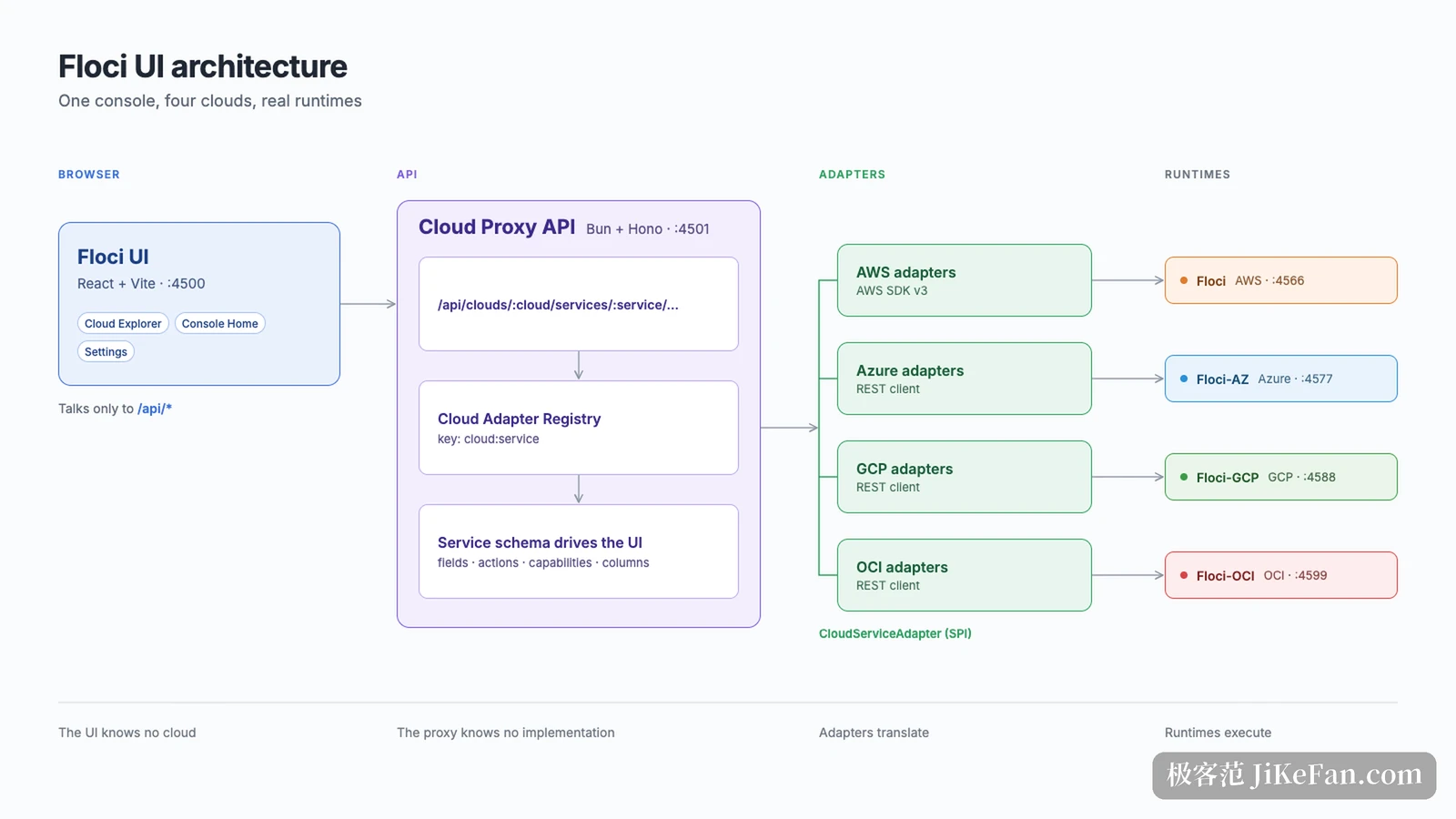
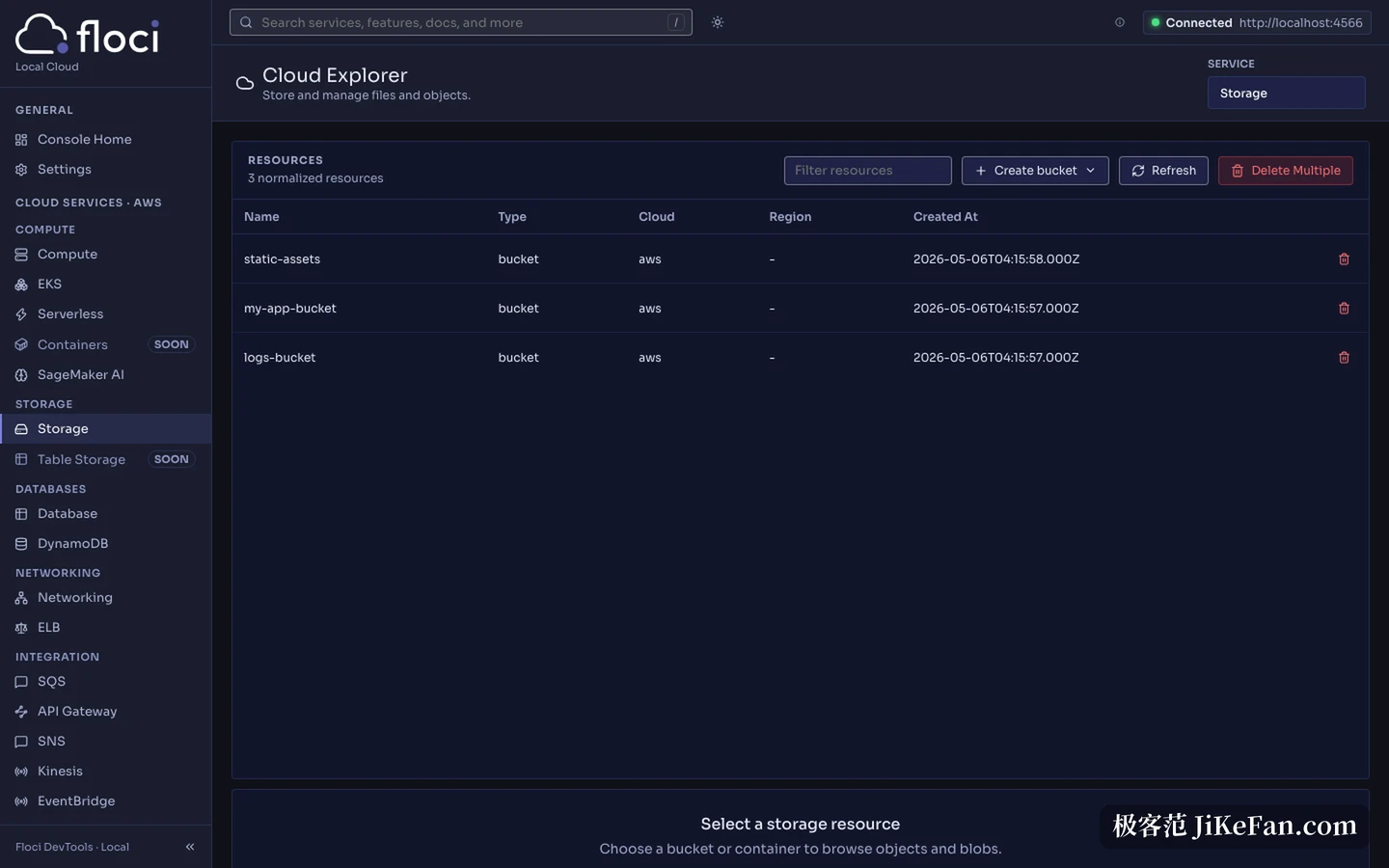
The benefit is that interface and cloud stay apart. Adding a cloud means adding an adapter and a service description, and the console does not change. In use, the home page gives the number of services and resources available for the running instance, the cloud switch is a button in the top right corner, and the storage page lists bucket name, type, owning cloud and creation time, with create and delete on the same row. The Azure instance in the screenshots reports 9 of 28 services available, so coverage follows the maturity of each cloud rather than treating all four alike.
Where 2.4 spent its effort
Version 2.4 shipped on 31 October. By the changelog the repository generates, it holds 210 new features, 10 performance improvements and 294 bug fixes, 514 entries together. Where they landed is visible at a glance: EC2 takes 62, CloudFormation 59, DynamoDB 40 and Lambda Web 22. The CloudFormation batch fills in particular resource types, EC2 prefix lists, WAFv2 IP sets, SES email identities and receipt rules, Route53 record sets, Redshift event subscriptions and RDS cluster role associations.
Read alone those entries are dull. Together they say one thing: the project wants infrastructure code to run locally. Trying a Terraform, OpenTofu or CloudFormation template against a real cloud costs money and time; locally it costs a restart. The release rhythm follows that use, with a stable cut on the 15th and another at the end of each month, and nightly tags tracking the trunk in between, so a fix is available the next day.
A few things to know before starting
Uneven coverage is the first reality. AWS is the main line with services in the hundreds, while Azure, GCP and OCI are visibly smaller, and the console still carries entries marked coming soon. Check the service list of the cloud you care about before deciding, and do not assume all four are equally deep.
It also needs Docker. Any service backed by a real engine needs a container runtime, and without that layer on the machine the capability is simply absent. State is disposable by default as well: stop and start again and you get a clean cloud. That is a virtue for tests and a drawback for anyone hoping to keep a long-lived local dataset, so read the storage settings first.
Nor is it a load generator. It preserves protocol behaviour, not throughput. The published Lambda figure is 289 requests per second, which is plenty to verify a function and meaningless as a capacity measurement.
The deeper judgement is that a local cloud is not about saving on the bill. It is about pulling the loop of change, run and look down to tens of seconds, and giving a coding agent a place where it can break things without consequence. Four emulators, one console and a set of native binaries are all trades made around that loop, which is why the protocol and the engines are the fine work, and coverage is the coarse one.
Moving a cloud onto your machine is impossible. Moving the interfaces of a cloud there is not. floci takes the second road: it does not promise to replace the real environment, only that every attempt happens off the bill.