
Hailuo AI: read one paragraph and it copies your voice, calls included
Summary
One paragraph of sample audio is enough to copy your own timbre, and one written sentence builds a voice that never existed. Around that sit synthesis with inline tags, vocal extraction, music and a live call that can be interrupted.
- Name
- Hailuo AI
- Version
- 0.1.794
- Open source
- Proprietary
- Operating system
- WebiOSAndroid
- Website
- https://hailuoai.com
- Updated
- 2026-10-06 18:32
This is a platform that treats the human voice as the main business rather than a feature bolted onto a chatbot. Read one paragraph of sample text and it copies your timbre. Type a sentence describing a voice that does not exist and it builds one. It also holds a live spoken conversation, interruptions included. Everything below concerns the speech layer only, because the clip and image side has been covered plenty elsewhere.
One thing is easy to get tangled in. Open the main site today and the most prominent block is short video, with generated clips and curated examples filling the page, while the speech tools have been gathered into a separate workbench whose navigation reads voice library, speech synthesis, music creation, voice design, voice cloning, vocal extraction. That is the shape of the product now: a collection of multimodal tools where video, image, speech and music each take a slice, and speech is the thickest of the four.
As of September 2026 the platform runs on the web and on phones, with iOS and Android side by side. On a computer you open a browser, since the desktop is the web app. Cloning and design, the two features that make the product interesting, are the part almost nobody has tried.
Read a paragraph, get your own timbre back
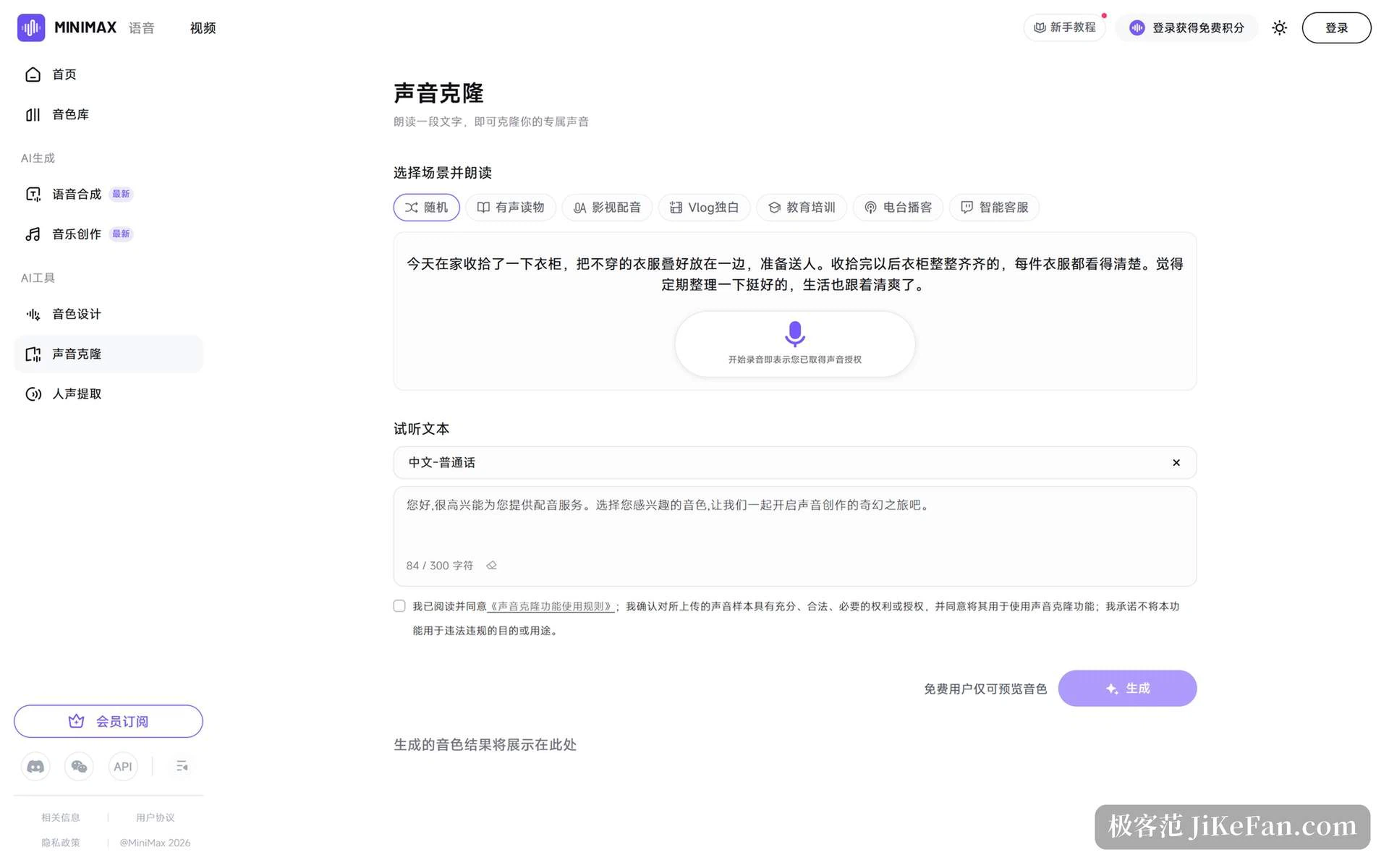
The cloning flow is shorter than expected. Enter the cloning page and a single line at the top explains the whole thing: read a passage, and your own voice is cloned. Below it sits a row of scenario presets — random, audiobook, film dubbing, vlog monologue, education and training, radio podcast, customer support — so you pick whichever you can read comfortably; beside that is the preview script, read in Mandarin, with a live character count.
Material required is modest: record or upload ten seconds to five minutes of audio, one file no larger than 50 MB. Two optional switches improve the resemblance — accent optimisation, and stripping background noise out of the sample — friendly to anyone recording in an ordinary room.
One caveat is worth stating early, before an evening disappears: cloning is a membership feature. A free account can hear the cloned result as a preview, but saving it for real use needs a subscription, and the small print beside the button says exactly that. Previews have their own allowance: five free auditions a day, shared between the cloning and design pages, so an audition on either one spends a share. After they run out, further attempts consume credits.
Membership is roomy by comparison. Subscribing unlocks as many as a hundred clone slots and stretches the generation ceiling to twenty hours of audio. For an audiobook or a running series that is enough that you are not deleting last week's voice to free a seat.
Synthesis: a tag inside the sentence changes the delivery
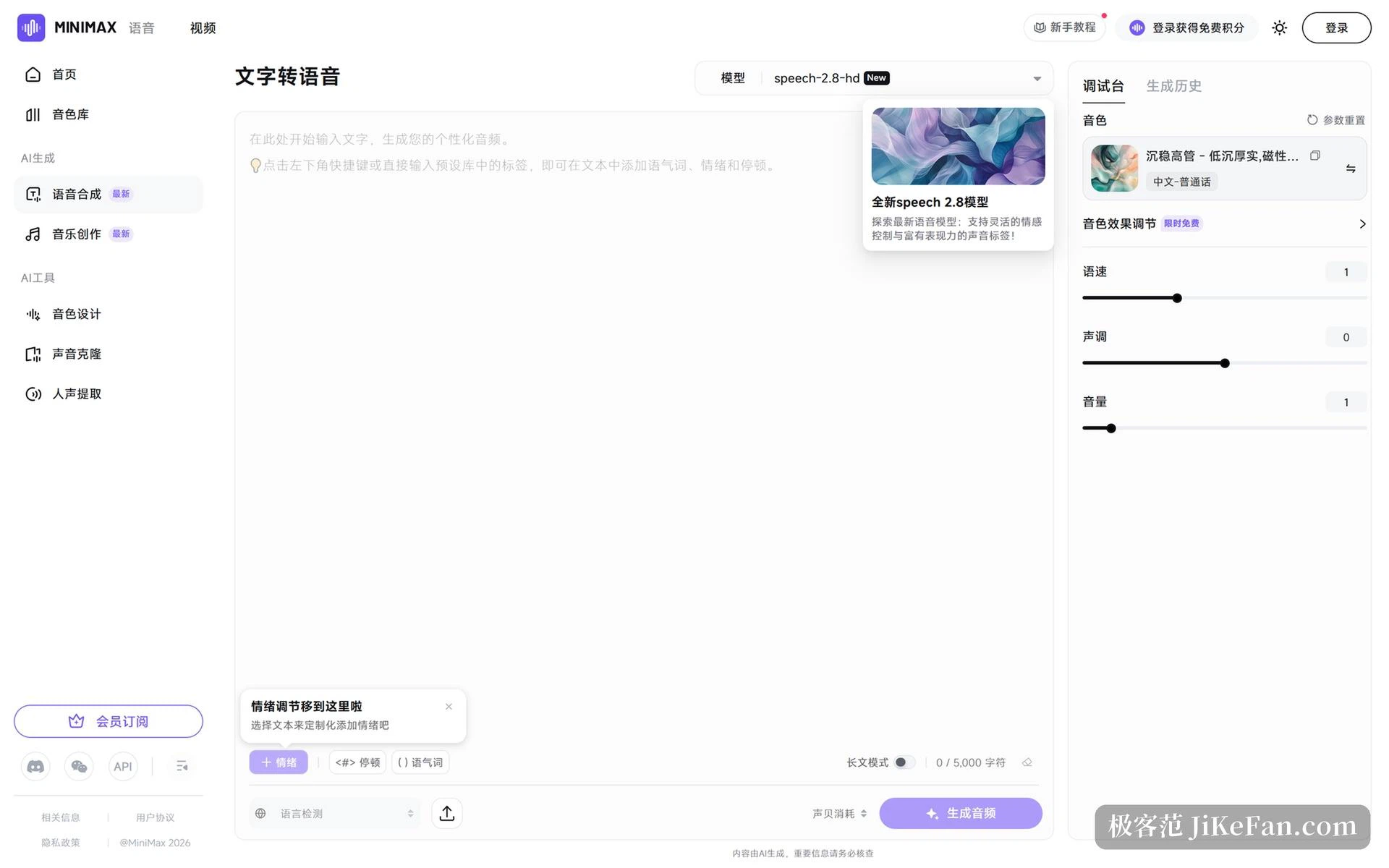
Cloning answers whether it sounds like you. Synthesis answers whether it sounds right. The current build defaults to the HD speech model, and the lower left of the input box offers markers you type straight into the body text: emotion, a pause, an interjection. Written inline — an emotion in front of a clause, a pause where a question mark would fall — they come back as rises and falls in the rendered audio.
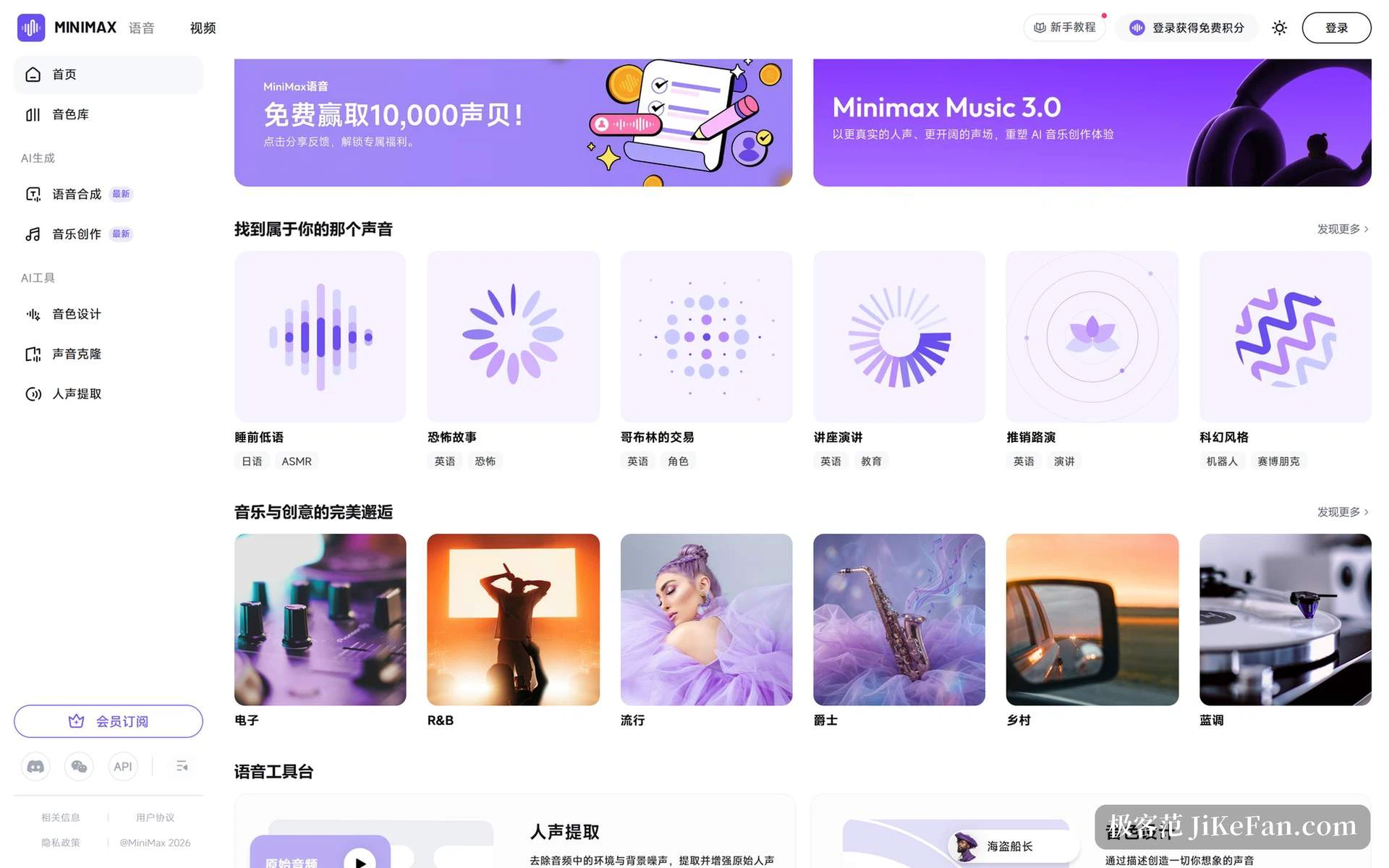
On the right sits a mixer: speed, pitch and volume on three sliders, plus a control for timbre effect, so swapping a voice and tuning again quickly lands on the feel you are after. The library is broad enough to browse rather than search — news reader, steady executive and other workplace voices alongside bedtime whisper, horror narration, goblin bargaining and science fiction for content and entertainment, each labelled with language and intended use.
Long text is a real strength. A single input holds five thousand characters in HD mode and ten thousand in Turbo; switch on long-form mode and one pass covers up to two hundred thousand characters, which puts a whole novel or an entire course deck inside normal use instead of something to split and stitch back together. The cost is waiting time, and the lower right corner estimates credit consumption live so the number is never a surprise afterwards.
Skip cloning: shape a voice out of a sentence
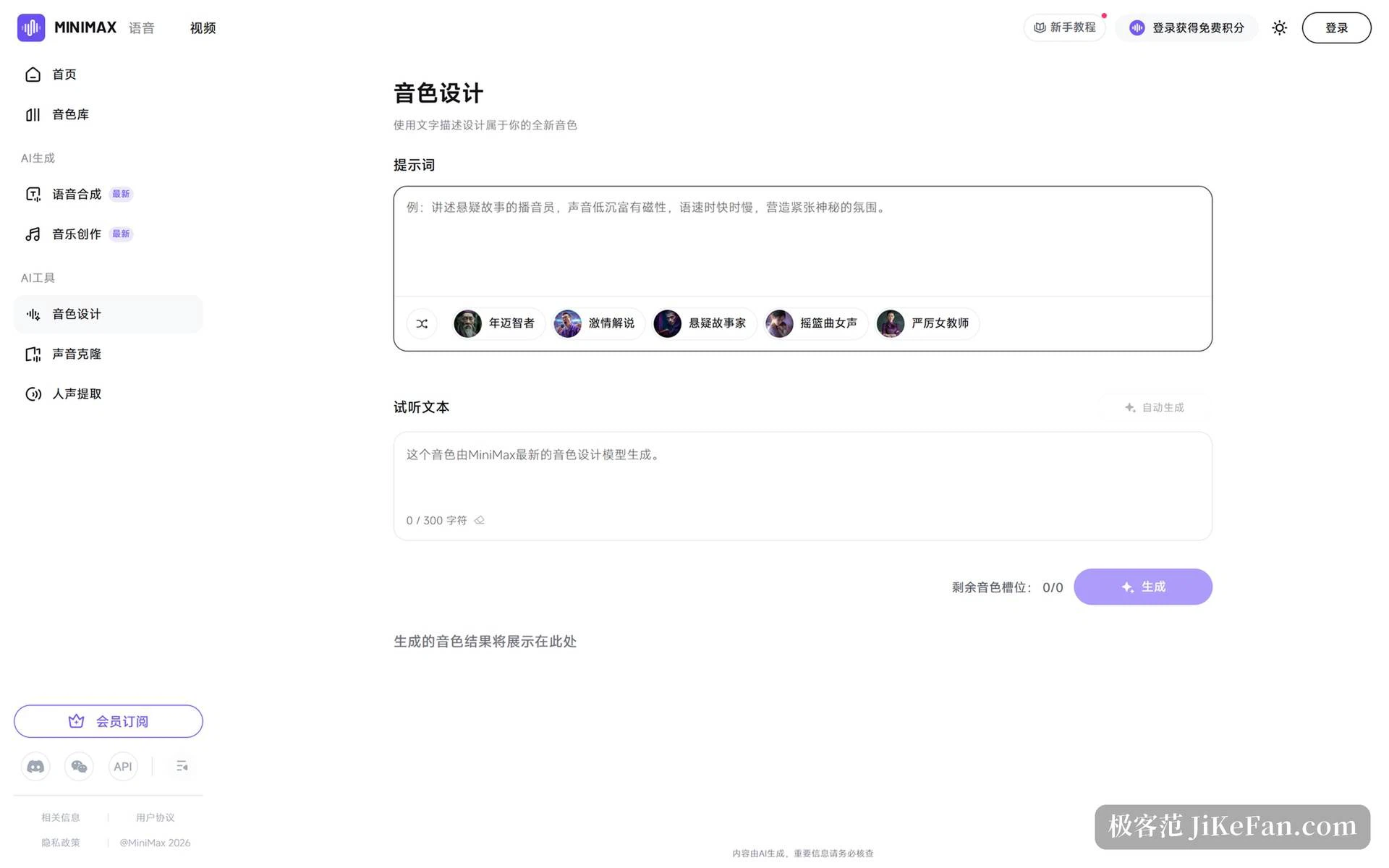
Voice design is the other route, and the one I prefer. It asks for no audio at all — a description does the work. The example on the page is unusually concrete: a podcast page telling a suspense story, the voice low and magnetic, pace quickening and slowing to build tension and mystery. Write down the characteristics you want and it builds a voice to match.
If phrasing feels like a chore, presets cover the typical directions: aged sage, passionate commentator, suspense storyteller, lullaby female, strict female teacher — enough for storytelling, commentary and winding down at night. The preview script can be your own or generated on the spot; by default it lands on the sentence saying the voice came from the newest design model.
The same daily allowance applies here, five free auditions shared with the cloning page, and the lower right corner shows the remaining slots. Cloned and designed voices both occupy one, so those hundred seats are split between the two features and worth keeping straight before planning a big batch.
Vocal extraction and music: the two small tools beside the main ones
The workbench also holds two everyday utilities. Vocal extraction pushes ambient noise and background sound down, pulls the original voice out clean and then lifts it — useful for podcast recording, a cover version or interview audio — inside a limit of five hundred megabytes and three hundred seconds per file. Music creation covers electronic, rhythm and blues, pop, jazz, country and blues, aimed at a short clip or a presentation needing a background track nobody else in the room used.
And there is a live call. The interface exposes settings for voice interruption and an opening line, plus status messages about microphone permission and connecting. Talking over it mid-sentence instead of waiting for the reply decides whether this works as a conversation or only as a reading of a script.
The specifications worth knowing
The developer is MiniMax. Platforms are web, iOS and Android, and the web side ships two separate builds — the main site and the voice workbench — which explains two unrelated build numbers if you go looking for them; that is two applications on separate release lines, with the phone apps on their own tracks. Clone material runs from ten seconds to five minutes at no more than 50 MB per file. Free auditions are five previews a day, shared between the cloning and design pages.
How far the free tier actually goes
The billing unit is the credit. A new account starts with ten thousand of them, which the documentation equates to more than twelve minutes of generated audio — enough to click through every feature and try a few short passages. After that, buy credit packs as needed without committing to a tier, or subscribe and open the clone slots and the generation ceiling at once.
The licence terms deserve a separate look. Personal use — social posts, a non-profit meeting — can use generated audio at no cost provided the official mark or a note about the source is included. Commercial use, meaning monetised content or a client project, needs the standard membership or above. The line is clear enough to be worth checking before you produce commercial material.
Read a paragraph to copy your own voice, write a sentence to invent another. What deserves attention is not how convincing either result sounds, but that both routes have dropped the entry cost to zero audio-editing experience.